The workflow automation market has seen vast evolution in recent years, with businesses actively hiring cost-effective solutions that deliver powerful capabilities without compromising scalability. As more organizations transition into using automated workflows, understanding which platform delivers better ROI financially, while being value-driven, matters now more than ever.
Introduction to Automation Platforms
What is n8n?
n8n is an open-source workflow automation platform that allows users to visually design automated processes connecting apps, APIs, and data sources, with or without code.
It supports over 400 integrations and can be self-hosted or used in the cloud, offering flexibility and full customizability for technical teams. Businesses use n8n to automate repetitive tasks across IT, marketing, finance, and operations. Read more about n8n workflow automation.
What is Zapier?
Zapier is a popular no-code automation platform that enables users to connect thousands of web apps and automate workflows through an easy-to-use visual interface.
It focuses on simplicity and accessibility, supporting 7,000+ app integrations and multi-step workflows without requiring any programming skills. Zapier primarily targets individuals and businesses seeking rapid, straightforward automation between mainstream services.
What is Make?
Make (formerly Integromat) is a visual workflow automation tool designed for building complex, multi-application processes using a drag-and-drop interface.
It offers granular control over data manipulation, flexible HTTP/API modules, and supports over 1,000 integrations, appealing to both technical users and those needing detailed automation scenarios. Make is used by startups and enterprises to orchestrate sophisticated data flows, periodic syncs, and multi-stage automations.
The Cost Reality
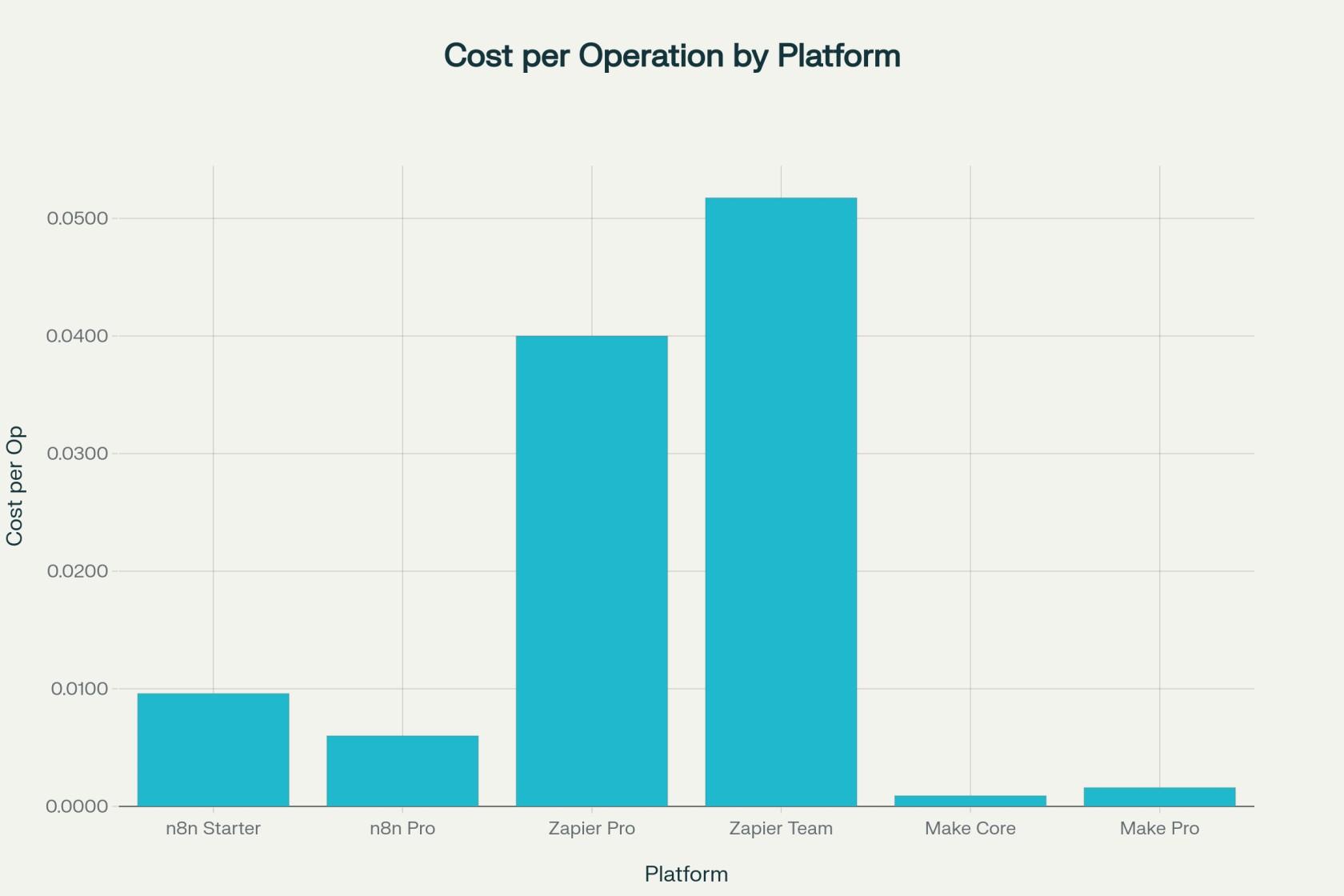
Among the automation platforms, Make offers the most competitive entry-level pricing at $0.0009 per operation. Alternatively, Zapier can cost up to 57× more at $0.0517 per operation for team plans.
However, n8n's open-source availability and self-hosted option provides unlimited executions for infrastructure scalability, making it the most economical choice for high-volume operations.
| Platform | Monthly Cost (USD) | Operations Tasks | Cost Per Operation | Cost Per Operation Formatted |
|---|---|---|---|---|
| N8n Cloud Starter | 24.0 | 2500 | 0.0096 | $0.0096 |
| n8n Cloud Pro | 60.0 | 10000 | 0.006 | $0.0060 |
| Zapier Professional | 29.99 | 750 | 0.04 | $0.0400 |
| Zapier Team | 103.5 | 2000 | 0.05175 | $0.0517 |
| Make Core | 9.0 | 10000 | 0.0009 | $0.0009 |
| Make Pro | 16.0 | 10000 | 0.0016 | $0.0016 |
2026 Pricing Update: What Changed
Automation pricing moves fast, and the table above needs a refresh if you're comparing n8n vs Zapier vs Make going into 2026. Here's what's verified against each vendor's official pricing page as of July 2026.
n8n
n8n removed active-workflow limits across every cloud tier in April 2026, so cost now scales purely with executions, not with how many workflows stay active.
Cloud Starter sits at $24/month for 2,500 executions, Cloud Pro at $60/month for 10,000 executions, and the self-hosted Business tier at $800/month for 40,000 executions with SSO and Git-based version control.
Teams under 20 employees can apply for a 50% startup discount on Business. The free, self-hosted Community Edition remains unlimited on executions — infrastructure is the only cost.
Zapier
Zapier still bills per task rather than per credit or execution.
Free stays capped at 100 tasks and two-step Zaps. Professional starts at $19.99/month on annual billing for 750 tasks, and Team runs roughly $69/month for 2,000 tasks with shared workspaces.
Triggers and filters don't consume tasks, but every action step does, so a five-step Zap running 1,000 times a month uses 5,000 tasks, not 1,000.
Make
Make's biggest 2026 change was a rename: "operations" became "credits" in August 2025, with the same underlying mechanics - one credit per module call, including triggers and iterators.
Core now starts around $9-$10.59/month for 10,000 credits, Pro around $16-$19/month, and Teams around $29-$34/month, all on annual billing.
Table: Updated 2026 Pricing
| Platform | Plan | Monthly Price (annual billing) | Included Volume | Billing Unit |
|---|---|---|---|---|
| n8n | Self-hosted Community | $0 + infrastructure | Unlimited | Execution |
| n8n | Cloud Starter | $24 | 2,500 | Execution |
| n8n | Cloud Pro | $60 | 10,000 | Execution |
| n8n | Business (self-hosted) | $800 ($400 with startup discount) | 40,000 | Execution |
| Zapier | Free | $0 | 100 | Task |
| Zapier | Professional | $19.99 | 750 | Task |
| Zapier | Team | ~$69 | 2,000 | Task |
| Make | Free | $0 | 1,000 | Credit |
| Make | Core | ~$9-$10.59 | 10,000 | Credit |
| Make | Pro | ~$16-$19 | 10,000 (priority execution) | Credit |
| Make | Teams | ~$29-$34 | 10,000 (team features) | Credit |
Pricing changes several times a year across all three vendors, so treat this table as directionally accurate rather than a live quote — confirm current numbers on each platform's pricing page, including Make.com pricing, before purchasing. Whichever way you weigh it, workflow automation pricing is the single biggest factor that separates n8n vs Zapier vs Make in practice, more than any feature list.
Pricing Model Fundamentals
Although the price data above does present actionable insights necessary for decision-making, it's one-dimensional, even in a direct comparison. To really identify the differences, looking into other dimensions of the price is fundamentally vital for making the right decision, especially for startups, in comparison with enterprises.
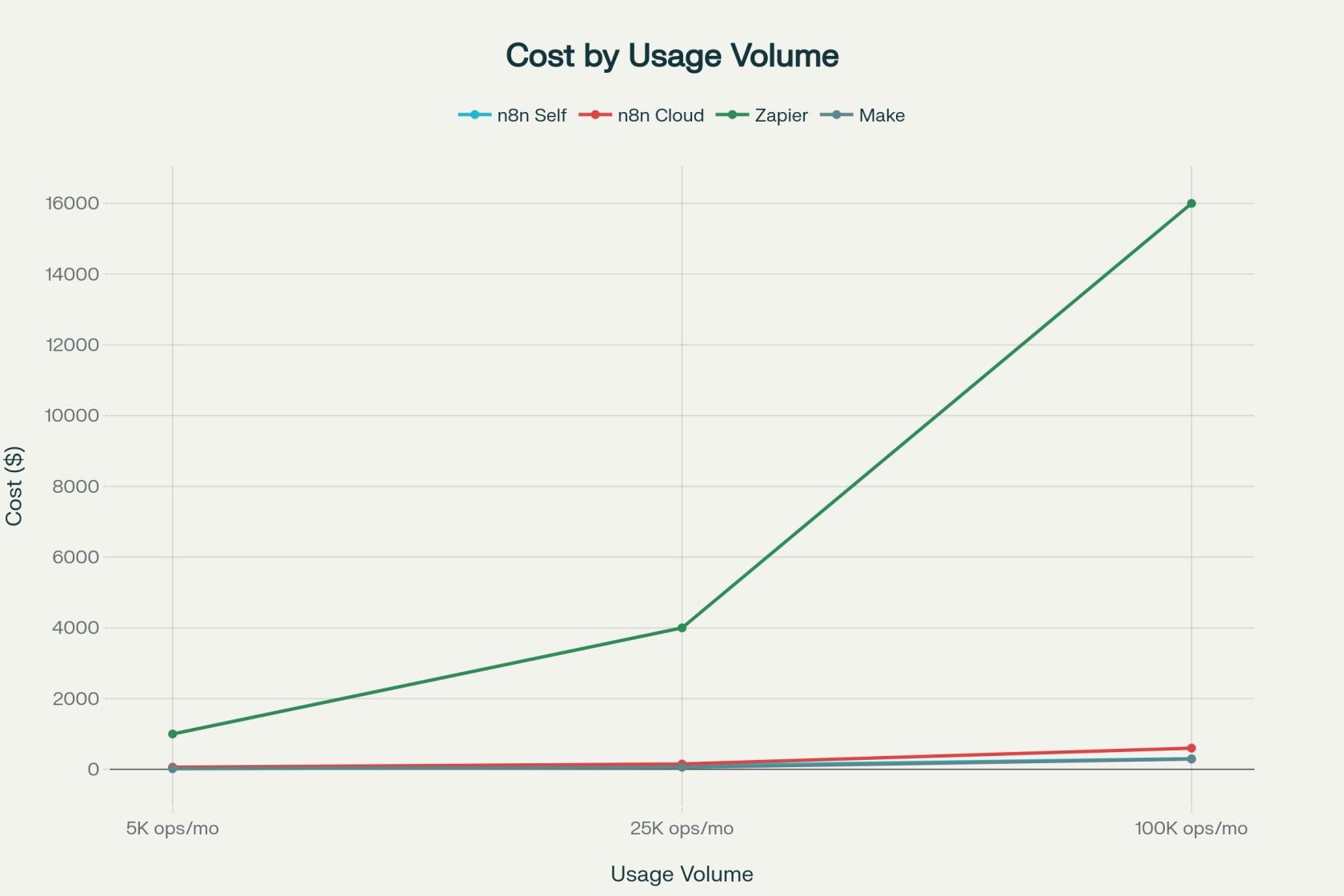
| Scenario | N8n (Self Hosted) | N8n Cloud | Zapier | Make |
|---|---|---|---|---|
| Small Startup (5K ops/month) | $50 (infrastructure) | $60 (Pro plan) | $999+ (overages) | $16 (Pro plan) |
| Growing Business (25K ops/month) | $100 (infrastructure) | $150 (scaled) | $3,999+ (enterprise) | $58 (scaled) |
| Enterprise (100K ops/month) | $300 (infrastructure) | $600+ (enterprise) | $15,999+ (enterprise) | $290+ (scaled) |
Understanding Different Billing Approaches
Each platform employs distinct pricing methodologies that significantly impact long-term costs.
- n8n
The n8n charges per workflow execution - regardless of complexity, a multi-step workflow counts as one execution. These execution-based models favor complex automations, where a 10-step workflow processing 1,000 records, will still count as just one execution.
- Zapier
The Zapier bills per task handled. It means, every individual action within a workflow consumes a task credit. For instance, a simple two-step automation processing about 100 records would consume 200 tasks, exhausting monthly allowances a little too quickly!
- Make
Making a name for itself, pun intended, Make uses operation-based pricing, wherein each module action counts as one operation, including triggers. In perspective, Make provides better value than Zapier's task-based model while also remaining more predictable than n8n's execution counting.
Comprehensive Cost Analysis
1. Startup Cost Scenarios
It's common knowledge that startups often have a vastly different cost landscape than enterprises. Therefore, the comparison in prices will be observed accordingly for deriving fair observations.
For small startups processing 5,000 operations monthly, the cost variations are pretty stark:
- Make Pro: $16/month - most budget-friendly option
- n8n Self-Hosted: ~$50/month infrastructure costs
- n8n Cloud Pro: $60/month
- Zapier Professional: $999+ due to possible overage charges
Real World Example: A marketing startup automating lead capture, CRM updates, and email sequences would consume approximately 5,000 operations monthly.
On Zapier Professional's 750-task limit, overages would cost $999+, while Make Pro accommodates this volume within its $16 base plan.
2. Enterprise Cost Predictions
An enterprise will have multiple connected workflows, sometimes across different departments, depending on the industry and business processes. However, it's undeniable that they’d likely collectively process 100,000+ operations monthly.
When you compare on such a large scale, the differences are too obvious.
- n8n Self-Hosted: $300/month infrastructure costs
- Make Enterprise: $290+ monthly
- n8n Cloud Enterprise: $600+ monthly
- Zapier Enterprise: $15,999+ monthly
Real World Case Study: One company documented their transition from Make to n8n, reporting monthly costs of $320 with n8n versus $7,600+ with Make for equivalent workloads. Ultimately, the company made $87,360 in annual savings.
Comprehensive Cost Analysis
1. n8n: Developer-Centric Flexibility
Self-Hosted Advantages:
- Zero per-execution fees for Community Edition
- Full data sovereignty and customization control
- Infrastructure costs typically $50-300/month depending on scale
Cloud Limitations:
- Limited to 2,500 executions on Starter plan ($24/month)
- Execution counting can be unpredictable for complex workflows
- Enterprise pricing becomes comparable to competitors at scale
Best For: Technical teams requiring unlimited customization, high-volume processing, or strict data control requirements.
2. Zapier: Simplicity with Premium Pricing
Strengths:
- 7,000+ integrations - largest ecosystem available
- Zero technical knowledge required for setup
- Comprehensive documentation and support
Cost Limitations:
- Rapid price escalation: Professional plan jumps from $29.99 to $999+ with moderate usage
- Task-based pricing penalizes complex workflows
- Enterprise plans can exceed $15,000/month for high-volume scenarios
Best For: Non-technical teams prioritizing ease of use over cost optimization, organizations with simple linear workflows.
3. Make: A Balanced Value Proposition
Competitive Advantages:
- Best cost-to-performance ratio among major platforms
- Visual workflow builder suitable for complex automations
- 10,000 operations for $9-16/month on entry tiers
Considerations:
- Smaller integration library compared to Zapier
- Steeper learning curve than Zapier
- Limited enterprise features without custom pricing
Best For: Growing businesses seeking powerful automation capabilities without premium pricing.
Technical Capabilities Comparison: n8n vs Zapier vs Make
Integration Eco Systems
| Platform | Integration Count | Custom API Support | Pre-built Connectors |
|---|---|---|---|
| Zapier | 7,000+ | Limited | Extensive |
| Make | 1,000+ | Flexible HTTP/API | Moderate |
| n8n | 350+ | Full JavaScript/API | Basic but extensible |
Advanced Features
1. Technical Superiority: n8n
- Native JavaScript execution for custom logic
- Custom node development capabilities
- Direct database connections and API integrations
2. Visual Power: Make
- Advanced data transformation and filtering
- Complex branching and conditional logic
- Real-time scenario monitoring
3. Operational Simplicity: Zapier
- Multi-step Zaps with conditional paths
- Built-in error handling and retry logic
- Extensive template library for quick setup
AI Agents in 2026: How the Three Platforms Compare
Why AI Has Become the Defining Factor in Workflow Automation?
The biggest shift since this comparison last ran isn't pricing - it's AI. n8n, Zapier, and Make all shipped native agent capabilities between late 2025 and early 2026, which changes the calculation for anyone still treating this as a simple app-to-app connector decision.
n8n's Self-Hosted AI Architecture for Enterprise Automation
n8n 2.0, released in January 2026, added native LangChain integration and roughly 70 AI-focused nodes. That gives technical teams persistent agent memory across executions, vector database connections for retrieval-augmented generation, and tool-calling patterns where an agent decides which node runs next.
Because it can be self-hosted, teams with data residency or compliance requirements can run these agents entirely inside their own infrastructure, which neither Zapier nor Make currently offers.
This self-hosted vs cloud automation trade-off is the single biggest fork in the road once AI enters the picture, and it's a meaningful point in any n8n open source evaluation, since the same license that enables free self-hosting also enables full control over where AI workloads run. For teams that write custom logic, n8n is still the automation tool for developers who want that level of control.
How Zapier and Make Approach AI-Powered Workflow Automation
Zapier leans on accessibility. Zapier Agents lets non-technical users spin up autonomous agents across its 7,000+ connected apps, and an AI Copilot inside the builder can turn a plain-English description into a working Zap. For teams that want AI-assisted automation without touching configuration files, this is the fastest route to production.
Make sits between the two. Maia, its conversational assistant, builds scenarios from natural-language prompts, and Make AI Agents (shipped February 2026) extends the visual canvas to multi-step agentic reasoning. It's a workable middle ground for teams that want more visual control than Zapier offers without n8n's technical overhead.
Which Platform Makes the Most Sense for AI-Driven Workflows?
None of the three replaces a dedicated LLM orchestration layer for a genuinely complex agent system, but for teams adding AI to existing operational workflows, this is now core to any n8n vs Zapier comparison rather than a footnote.
Need a self-hosted, LangChain-ready n8n setup without building it in-house? Our n8n workflow automation service handles the architecture, custom node development, and ongoing maintenance so your engineers stay focused on product work rather than pipeline upkeep.
ROI Calculations and Business Impact
1. Quantifying Automation Value
A few Typical ROI scenarios are developed based on globally available implementation data:
Small Business Example (10 employees, 20 hours/week manual tasks)
- Current labor cost: $24,000/year ($12/hour × 20 hours × 52 weeks)
- Automation reduces to 2 hours/week
- Annual savings: $21,600
- Tool cost (Make Pro): $192/year
- Net ROI: 11,150%
Enterprise Example (100 employees, 5 hours/week manual tasks):
- Current labor cost: $1,300,000/year ($50/hour × 500 hours × 52 weeks)
- Automation reduces to 1 hour/week total
- Annual savings: $1,170,000
- Tool cost (n8n Enterprise): $15,000/year
- Net ROI: 7,700%
2. Hidden Costs and Considerations
Implementation Costs:
- Basic setup: $500-2,000 one-time
- Complex deployment: $8,000-20,000+ for enterprise scenarios
- Training and handover: $300-2,000 per implementation
Ongoing Maintenance:
- Monthly support retainer: $200-1,500
- Platform updates and monitoring
- Scaling infrastructure for self-hosted solutions
Strategic Recommendations by Business Type
1. For Startups (< 50 employees)
Primary Recommendation: Make Pro ($16/month)
- Provides 10,000 operations within budget constraints
- Visual interface accessible to non-technical founders
- Scales cost-effectively to mid-size business volumes
Alternate Recommendation: n8n Self-Hosted
- Unlimited automation potential
- Infrastructure costs remain predictable
- Full customization for unique business requirements
Note: The above alternate recommendation about n8n self-hosted is strictly suitable only to technical-founded teams. If you need further assistance, its best to contact or hire an n8n automation expert from Ciphernutz.
2. For Growing Businesses (50-500 employees)
Primary Recommendation: n8n Cloud Pro ($60/month)
- Balances managed hosting convenience with cost control
- Handles moderate complexity without per-task penalties
- Provides upgrade path to self-hosted for scale optimization
Alternate Recommendation: Make Teams ($29/month)
- Team collaboration features for growing organizations
- Maintains cost advantage over Zapier at moderate volumes
3. For Enterprises (500+ employees)
Primary Recommendation: n8n Self-Hosted
- Unlimited execution potential with fixed infrastructure costs
- Full data sovereignty for compliance requirements
- Complete customization for complex enterprise workflows
Alternate Recommendation: Make Enterprise
- Professional support and enterprise security features
- Visual workflow management for cross-department collaboration
How To Future-Proof Your Automation Investment?
Scalability Considerations
n8n's execution-based pricing provides the most predictable scaling model for high-growth scenarios. As workflow complexity increases, costs remain stable, unlike task-based models where expenses multiply with each additional step.
Make's operation limits may require plan upgrades but offer better value retention compared to Zapier's exponential pricing curves.
Zapier's premium pricing becomes justifiable only for organizations prioritizing simplicity over cost optimization, particularly in departments with limited technical resources.
Technology Evolution
The automation landscape continues advancing toward AI-powered workflow intelligence and no-code democratization. Platforms investing in these capabilities while maintaining cost-effectiveness will provide superior long-term value.
n8n's open-source foundation ensures continuous community innovation and customization potential. Make's balanced approach provides enterprise features without excessive premium pricing. Zapier's extensive ecosystem remains valuable for organizations requiring maximum integration breadth despite higher costs.
n8n vs Zapier vs Make: 2026 Verdict at a Glance
If you read only one section of this n8n vs Zapier vs Make breakdown, read this one.
| Criteria | n8n | Zapier | Make |
|---|---|---|---|
| Best for | Developers, high-volume, self-hosted teams | Non-technical teams, fastest setup | Visual builders, mid-complexity workflows |
| Starting price (2026) | Free self-hosted / $24/month cloud | Free / $19.99/month | Free / ~$9-$10.59/month |
| Billing unit | Per execution | Per task | Per credit |
| Integrations | 400+ native, extensible via API/HTTP | 7,000+ | 1,000+ |
| Self-hosting available | Yes, free Community Edition | No | No |
| AI capability | LangChain-native, 70+ AI nodes | Zapier Agents & Central | Maia + Make AI Agents |
| Learning curve | Moderate to steep | Easiest | Moderate |
| Cost at 100K ops/month | Cheapest (self-hosted) | Most expensive | Mid-range |
| 2026 verdict | Best automation tool 2026 pick for developers and cost control at scale | Best for speed and non-technical teams | Best value for visual, mid-complexity automation |
Quick read: For a straight Make vs n8n self-hosted decision on cost alone, self-hosted n8n wins once volume climbs past roughly 10,000-20,000 monthly executions and a technical team is available to run it. Make wins if hosted simplicity matters more than the lowest possible unit cost. Zapier still leads when ease of use and integration breadth outweigh price.
Conclusion: Key Decision Factors
Choose n8n Self-Hosted When..
- Technical team available for setup and maintenance
- High-volume processing requirements (>25K operations/month)
- Strict data sovereignty or customization needs
- Budget-conscious with technical capabilities
Choose Make If:
- Seeking best cost-to-feature ratio
- Visual workflow design preference
- Moderate technical requirements
- Growing business needing scalable pricing
Choose Zapier If:
- Non-technical team requires simple setup
- Extensive integration requirements outweigh cost concerns
- Prioritizing speed of implementation over optimization
- Budget allows for premium convenience pricing
The automation platform choice ultimately depends on balancing technical capabilities, cost constraints, and organizational priorities. For most businesses, Make provides optimal value, while n8n self-hosted offers maximum cost efficiency for technical teams, and Zapier serves organizations prioritizing simplicity over cost optimization.
Can’t decide the best automation tool for your organization or industry use-cases?
Connect with the Ciphernutz Team!
Frequently Asked Questions
What is the best automation tool in 2026?
There isn't one answer for every team. n8n wins on cost and control for technical teams willing to self-host or manage execution-based billing. Zapier wins on speed and integration breadth for non-technical teams. Make wins on value for teams that want a visual builder without Zapier's task-based costs.
How does the n8n vs Zapier comparison change at scale?
At low volume, the difference is minor. Past a few thousand monthly runs, n8n's execution-based pricing pulls ahead because a 10-step workflow still counts as one execution, while the same workflow costs 10 tasks on Zapier. Self-hosted n8n removes the execution ceiling entirely.
Is Make vs n8n self-hosted a fair comparison?
Only partly. Make is fully hosted with nothing to manage, while self-hosted n8n needs a server and some operational know-how but carries no per-execution fee. Teams without technical capacity usually prefer Make; teams with a developer on staff often save more with self-hosted n8n once volume grows.
Which platform wins a no-code automation comparison for beginners?
Zapier remains the easiest starting point for a true no-code automation comparison, thanks to its interface, templates, and 7,000+ integrations. Make is a close second with a steeper but still visual learning curve.
What are the best Zapier alternatives for cost-conscious teams?
Make and n8n are the two most common Zapier alternatives, mainly because both avoid Zapier's per-task billing. Make suits teams that want a hosted, visual alternative; n8n suits teams comfortable self-hosting or paying for execution-based cloud plans.